
Galaxy Glow - Launcher Theme5.0.8 - Google Play
You'll be able to see results in few seconds.
Publisher Description
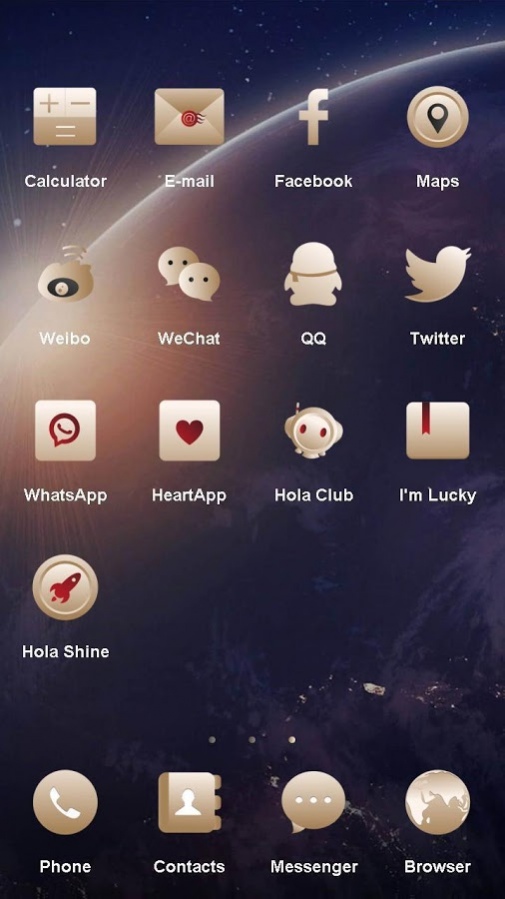
Galaxy Glow - Launcher Theme
The best and brand new S7 Galaxy launcher and theme is now on android and it's free. Download this simple beautiful theme now and decorate your phone! This theme has high quality wallpaper and unique icons!
Ignite the flame with the cool Galaxy Glow theme.
Download and set your screen on fire!
This is not a stand-alone app. You must have Hola Launcher to apply it! Download Hola Launcher here:
https://play.google.com/store/apps/details?id=com.hola.launcher
!
The theme can run perfectly in both Android phones & tablets!
★
How to apply the Theme:
★
1. Download and install this theme
2. Make sure Hola Launcher is enabled
3. Go to Personalize, Theme, then choose the theme and apply!
You can find and download more of our well-designed themes by following the below steps:
Tap the link and visit the
Theme Store
at
http://h5.holalauncher.com/theme/list.html?e=gp
, then choose the themes you like and download via Google Play Store!
Your comments will motivate us to create a better app for you!
Get in touch with us via holalauncher@gmail.com.
★
Hola Launcher Features:
★
● HD icon
- including 90% the icon of the popular applications
●Quick Access
- A simple swipe from a bottom corner opens a smart menu of your frequently used apps and settings.
● Boost
- Free up memory (RAM) and further speed up your phone with a single tap!
●Hide apps
- Protect your privacy by swiping up with two fingers to hide apps you don't want displayed on your desktop.
● App Lock
- App Lock allows you to add pattern or numeric passwords to lock individual apps preventing unauthorized people from opening them and accessing information you want to keep private. Support fingerprint reader (mobile phone with fingerprint sensor and above android 6.0)
● Search
- Swipe down on your screen to quickly find apps, contacts, or websites. You can also use voice search!
● Personalize
- Download, install, and enjoy free high-quality themes, wallpapers, and fonts. Updated every Friday!
● Intercept
- Keep your desktop clean and clutter-free by manually approving any shortcuts added to your desktop!
● Notifications
- Never miss an important message again from your friends and family with home screen icon notifications.
● Screen Lock
- Double-tap your desktop to lock your phone's screen, freeing up and extending your power button's life.
● Weather Forecast
- Conveniently see weather forecast information for the next 6 days.
● Priority Apps
- Place the apps you use most on your default home screen, so they launch faster.
● Smart Folders
- Keep your apps organized with specific folders for Games, Themes, Tools, Lifestyle, Social media, etc.
About Galaxy Glow - Launcher Theme
The company that develops Galaxy Glow - Launcher Theme is Launcher - Themes. The latest version released by its developer is 5.0.8.
To install Galaxy Glow - Launcher Theme on your Android device, just click the green Continue To App button above to start the installation process. The app is listed on our website since 2017-12-29 and was downloaded 0 times. We have already checked if the download link is safe, however for your own protection we recommend that you scan the downloaded app with your antivirus. Your antivirus may detect the Galaxy Glow - Launcher Theme as malware as malware if the download link to com.hola.launcher.theme.diy.Galaxy.Glow.decent.freethemes is broken.
How to install Galaxy Glow - Launcher Theme on your Android device:
- Click on the Continue To App button on our website. This will redirect you to Google Play.
- Once the Galaxy Glow - Launcher Theme is shown in the Google Play listing of your Android device, you can start its download and installation. Tap on the Install button located below the search bar and to the right of the app icon.
- A pop-up window with the permissions required by Galaxy Glow - Launcher Theme will be shown. Click on Accept to continue the process.
- Galaxy Glow - Launcher Theme will be downloaded onto your device, displaying a progress. Once the download completes, the installation will start and you'll get a notification after the installation is finished.
Program Details
System requirements
Download information
Pricing
Version History
version 5.0.8
posted on 2017-12-29
Disclaimer
Official Google Play Link
We do not host Galaxy Glow - Launcher Theme on our servers. We did not scan it for viruses, adware, spyware or other type of malware. This app is hosted by Google and passed their terms and conditions to be listed there. We recommend caution when installing it.
The Google Play link for Galaxy Glow - Launcher Theme is provided to you by apps112.com without any warranties, representations or guarantees of any kind, so access it at your own risk.
If you have questions regarding this particular app contact the publisher directly. For questions about the functionalities of apps112.com contact us.
